
If you are a Department Head or higher in the Workflows pipeline, you will be approving Board Items that are routed to you. Here is a quick screencast with more detailed instructions below.
Overview
There are four options when you receive a Board Item for approval
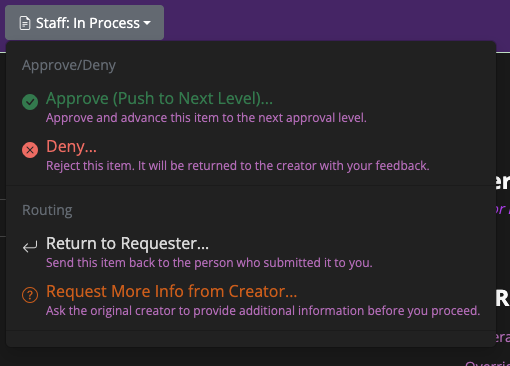
- Approve
- Deny
- Return
- Request Information
Approve A Board Item
When you select “Approve”, you are “signing your name” to the Board Item and advancing it to the next approval level.
Deny
If you chose “Deny”, you will need to provide a reason in the note area and the Board Item will be returned to the creator and stop the approval process. This can not be undone and will terminate the board item.
Return
Returning the Board Item allows the creator to resubmit the Item. Instead of terminating the process, the creator can make edits and then resubmit the Item through the pipeline again.
Request Information
Sometimes you just need to ask a question before you Approve or Deny a Board Item. With this option, you can send a note back to the Creator and “pause” the process until you get your answer.